
Register and login to use the Lightboxes and Client Area.
There are 0 registered members and 15 guests currently viewing the site.

A password will be e-mailed to you.
- Hello Guest!
- Log In | Register
- Online Members: 0 Guests: 15
There are 0 registered members and 15 guests currently viewing the site.
A password will be e-mailed to you.

|
||||||||||||||||||||||
Photographer's World Database of Countries, States, and CitiesWhat is it? This website runs on a database that references all the photos online with the correct spelling and location for countries, states, and cities all around the world. It uses a number of separate tables to keep the information compact, fast to access, and easy to maintain. A number of people have expressed interest in this database, so I have now decided to offer an adapted version for anyone to use. Who is it for? This database is ideally suited for any photographer who also likes experimenting with web pages and databases, but who previously couldn't find a source of all the data. It is useful for someone who wishes to set up an online database-driven gallery of their photos, or for someone who wants to keep track of all their own photographs on a local computer. What's on offer? The database being offered here has 8 tables:
The first 3 tables: Country, State, and City are the heart of the database. They contain information about each of these categories, and how they inter-relate. The fourth table, Flag, allows the database to link to a flag image for each country. There are also flags for US, Canadian, and Australian states. All are cross-referenced so that the flags, which are included with the database tables, can be used on your own website. Here are a few examples of the flags. There are more details on the Flags page. 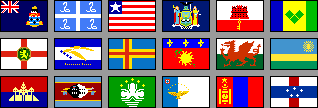
The remaining 4 tables: Theme, Class_Of_Place, Type_Of_Place, and Photo, are included at no charge: they are 'ideas' tables, to help you organise your photos in a more constructive way, and to help you provide themed collections and galleries. 'Photo' is the table where you store details of your own photos, for the database to reference and display. It has been given some sample entries to help you understand the style. Anything else? Also included is a complete SQL script to set up the database automatically, and some sample queries that you can use to start working with the data. Each table is described in a comprehensive way, and a Sample sub-set of the Database, with installation notes and script, is provided free-of-charge for you to try out before you buy: its on the Download page. What will I need to use it? The data tables are provided in a set of CSV files, so that they can be imported into a database of your choice. The data tables are also provided in an SQL script, so that they can be loaded straight into an SQL database server. If you intend to use the tables online, you will need a host with mySQL and PHP configured, and at least 1 free database. You will also need some way of uploading your database tables, setting a User account, and configuring the database itself: this usually means 'phpMyAdmin' or similar. IF YOU DON'T UNDERSTAND WHAT I HAVE JUST SAID, DO SOME RESEARCH BEFORE PROCEEDING FURTHER. Can I just LOOK at the data? Maybe you are a photographer who needs a comprehensive list of world countries, states and cities to use when sorting or key-wording your photographs. You don't want to use the data in a database - you just want to look at the data, and then copy and paste it into Adobe PhotoShop, LightRoom, Bridge, or other image keywording programs. No problem - nothing could be easier. The data tables are provided in a set of CSV files, and you can look at them in any program that can display that format. At the simplest, you could use any Text Viewer program, such as NotePad, but I would recommend a dedicated CSV viewer, such as CSVed Interested? Then please visit these pages: |
Stock Photograph SearchAdvanced Search Page
Tag Cloud
0
all
alma-ata
architect
are
argentina
ark
artistic
ashgabat
beijing
bolivia
buddhist
cabinda
canada
car
china
city
creativity
culture
door
doors
end
foz do iguacu
history
horizon
india
kazakhstan
kerala
la paz
land
man
men
military
moskovskaya oblast
museum
nature
nizhny novgorod
one
onguday
outdoor
people
rajasthan
rio
russia asiatic
russia european
salta
semipalatinsk
transport
uniform
use
Popular searches on this site. Latest Photos
Random Photo Small Mongolian boy in a red hat and jacket.. | |||||||||||||||||||||
|
Web design by gnomeplanet.com :: All images and pages on this site are © 2008 - 2024 and remain the property of gnomeplanet.com :: All rights reserved | ||||||||||||||||||||||
 . Its very versatile, and its free. To use it, see my


